

Did you know that nearly 60% of remote workers prefer outdoor spaces for productivity? If you’re pondering a winter gazebo as your workspace, ensuring reliable internet access is essential. From evaluating your current WiFi coverage to selecting the right equipment, there are several factors to take into account. Let’s explore how you can optimize your setup for both comfort and connectivity in the chilly months ahead.



Assessing Your Current WiFi Coverage
How well does your WiFi reach your winter gazebo? To find out, start by checking your coverage map. This’ll show you where your signal shines and where it falters. Move around your property, testing the WiFi speed in different spots, especially near your gazebo. If the signal drops greatly, you might need to rethink your setup. Consider obstacles like trees or walls that could block your connection. By evaluating your current WiFi coverage, you’ll guarantee you can enjoy seamless internet access while you relax in your winter retreat, staying connected without compromise.
Choosing the Right Equipment
When it comes to ensuring reliable internet in your winter gazebo, selecting the right equipment is vital. You’ll need essential WiFi gear that can withstand the elements while providing strong coverage. Plus, weatherproofing your setup will help protect your devices from harsh winter conditions.
Essential WiFi Equipment
Setting up a reliable WiFi network in your winter gazebo requires the right equipment to guarantee you stay connected even in the colder months. Start with a high-quality WiFi router that offers strong coverage and speed. Consider the antenna types as well; omnidirectional antennas are great for general coverage, while directional antennas can focus on specific areas, enhancing signal strength. If your gazebo is far from your main router, a WiFi extender can help bridge the gap. By investing in the right equipment, you can enjoy seamless internet access, ensuring your winter retreats are cozy and connected.
Weatherproofing Your Setup
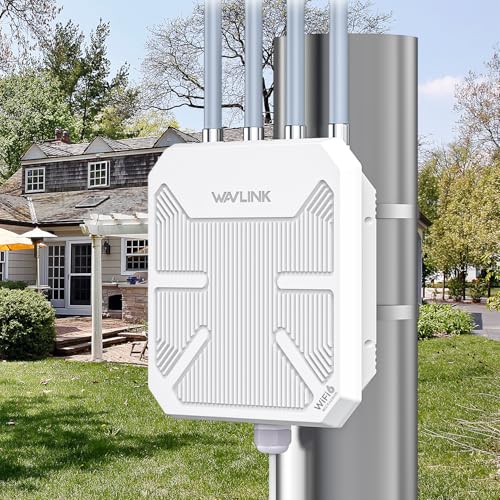
To keep your WiFi setup functional during winter in your gazebo, choosing weatherproof equipment is key. Opt for routers and extenders built with weatherproof materials to withstand moisture and cold. Look for devices that have an IP rating indicating protection against dust and water. Additionally, use insulation techniques, like placing your equipment in a heated enclosure or using thermal wraps, to further shield against the elements. Don’t forget to secure cables and connections with weather-resistant covers to prevent damage. With the right gear and protections, you can enjoy seamless internet access while staying cozy in your winter gazebo.
Utilizing WiFi Extenders and Mesh Systems
To keep your winter gazebo connected, consider using WiFi extenders and mesh systems. These solutions can enhance coverage and improve internet speed, making your outdoor space more enjoyable. We’ll cover the benefits of each option and share some easy installation tips.
WiFi Extender Benefits
WiFi extenders and mesh systems can greatly enhance your online experience in winter gazebos, where connectivity might otherwise be weak. By strategically placing your extenders, you can guarantee reliable internet access throughout your space. Here’s a quick look at the benefits of different WiFi extender types:
| WiFi Extender Types | Benefits |
|---|---|
| Plug-in Extenders | Easy setup, portable |
| Powerline Extenders | Uses existing wiring |
| Outdoor Extenders | Weather-resistant |
| Mesh Systems | Seamless coverage |
| Dual-band Extenders | Faster speeds |
With the right placement, you’ll enjoy uninterrupted browsing in your cozy gazebo.
Mesh System Advantages
Using mesh systems can elevate your internet experience in winter gazebos even further than traditional extenders. With mesh network benefits, you’ll enjoy seamless coverage throughout the space, eliminating those frustrating dead zones. Unlike extenders, which can create spotty connections, a mesh system uses multiple nodes to create a unified WiFi signal. This means you can stream, browse, and video chat without interruptions. Plus, it’s easy to expand your network by adding more nodes when needed. Embracing a mesh system lets you stay connected and enjoy your winter retreat, giving you the freedom to relax and work without limitations.
Installation Tips Explained
Although setting up your internet connection in a winter gazebo might seem challenging, it can be straightforward with the right approach. Start by choosing a WiFi extender or mesh system to boost your signal. Pay attention to cable management; keep wires tidy and secure to prevent tripping hazards. For peak performance, avoid placing your devices near metal objects or thick walls that can cause signal interference. Position your extender or mesh units strategically to guarantee even coverage throughout the gazebo. With these installation tips, you’ll enjoy seamless connectivity while relaxing in your winter retreat, embracing the freedom of the outdoors.
Protecting Your Equipment From the Cold
As winter sets in, protecting your equipment from the cold becomes essential to guarantee consistent performance. Cold weather can drastically impact equipment longevity, so consider using equipment insulation and thermal wraps. These preventive measures help mitigate temperature effects and moisture concerns, ensuring your devices stay functional. Invest in protective housing to shield your gear from harsh elements. Additionally, proper gear storage is vital; keep your equipment in a dry, insulated area during extreme cold. Regular winter maintenance checks will help you catch potential issues early, allowing you to enjoy your winter gazebo without interruptions. Stay warm and connected!
Optimizing Your Network Settings
To guarantee you stay connected in your winter gazebo, it’s essential to optimize your network settings for the best performance. Start by accessing your router’s advanced router settings. Change the channel to avoid interference from neighboring networks and switch to a less crowded band, if possible. Utilize network optimization techniques like Quality of Service (QoS) to prioritize bandwidth for your devices. Regularly update your router’s firmware to enhance security and performance. By fine-tuning these settings, you’ll enjoy a seamless online experience, allowing you the freedom to connect and relax in your cozy winter retreat without interruptions.
Enhancing Signal Strength With Smart Placement
When you’re setting up your winter gazebo, smart placement of your router can greatly enhance your WiFi signal strength. To achieve ideal signal boosting, consider positioning your router in a central location, away from walls or obstructions. Elevate it on a shelf or mount it high to minimize interference. Avoid placing it near metal objects or electronic devices that can disrupt the signal. If possible, use a WiFi extender to further improve coverage. With careful router positioning, you’ll enjoy reliable connectivity, allowing you to embrace the freedom of staying connected while enjoying your cozy winter retreat.
Creating a Cozy and Functional Setup
Creating a cozy and functional setup in your winter gazebo not only enhances comfort but also encourages you to make the most of your space. Start by choosing functional furniture that can adapt to your needs, like a foldable table or weather-resistant seating. Pair this with cozy decor—think warm blankets and soft lighting—to create an inviting atmosphere.
| Furniture Type | Decor Idea |
|---|---|
| Foldable Tables | String Lights |
| Weather-Resistant Chairs | Warm Throws |
| Storage Ottomans | Lanterns |
| Outdoor Rugs | Potted Plants |
| Cushioned Benches | Wall Art |
Troubleshooting Common Connectivity Issues
A cozy winter gazebo setup is perfect for enjoying the season, but connectivity issues can quickly disrupt your relaxation. If you’re facing slow speeds, check for network interference from nearby devices like microwaves or Bluetooth speakers. Additionally, signal congestion can occur if too many devices are connected at once. To improve your connection, try repositioning your router or using a WiFi extender. Disconnecting unused devices can also help clear congestion. Finally, verify your firmware is updated, as this can optimize performance. With these tips, you can enjoy seamless browsing while savoring the winter scenery in your delightful gazebo.
Frequently Asked Questions
Can I Use My Smartphone as a Wifi Hotspot in the Gazebo?
Yes, you can use your smartphone as a WiFi hotspot in the gazebo. Just verify your device’s compatibility and follow the hotspot setup instructions in your settings. It’ll give you the freedom to connect wherever you want!
What Are the Best Indoor Plants to Improve Air Quality in My Gazebo?
To improve air quality in your gazebo, consider snake plants, peace lilies, or spider plants. These air purifying plants offer indoor plant benefits, helping you breathe easier while enjoying your space. You’ll feel more relaxed!
How Can I Keep My Winter Gazebo Warm While Using Wifi Equipment?
To keep your winter gazebo toasty while using WiFi, think extreme! Insulation tips like heavy curtains and thermal wraps combined with efficient heating solutions can transform your space into a cozy digital retreat. Enjoy the warmth!
Are There Any Solar-Powered Wifi Options for Outdoor Use?
Yes, there are solar-powered WiFi options that provide outdoor connectivity. By installing solar panels, you can harness sunlight to power your devices, giving you freedom to enjoy your space without worrying about cords or outlets.
What Should I Do if My Neighbors’ Wifi Interferes With My Signal?
Isn’t it funny how your neighbors’ WiFi seems stronger than yours? You could try signal boosters or network extenders to enhance your connection. Sometimes, a little help goes a long way in reclaiming your freedom.